Showing posts with label OpenSource. Show all posts

Friday, March 18, 2016

Measuing latency with HdrHistogram

I had the pleasure last year to meet with Gil Tene, an authority on building high performance software and specifically high performance JVM implementations. He gave a brilliant presentation at React San Francisco and then again at YOW in Australia on common mistakes made when measuring performance. He he explained that measuring latency is not about getting a number, but identifying behavior and characteristics of a system.

Often when we set out to measure the performance of our software we can be guided by NFR (Non-Functional Requirements) that really don't make too much sense. More than once I have been presented with a requirement that the system must  process x requests per time-period e.g 5 messages per second. However as Gil points out this single number is either unreasonable, or misleading. If the system must always operate in a state to support these targets then it may be cost prohibitive. This requirement must also define 100% up-time. To work around that, some requirements specify that the mean response time should be y. However this is potentially less useful. By definition what we are really specifying is the 50% of requests must see worse performance than the target.

A useful visualization for pointing out the folly of chasing a mean measurement is illustrated below.
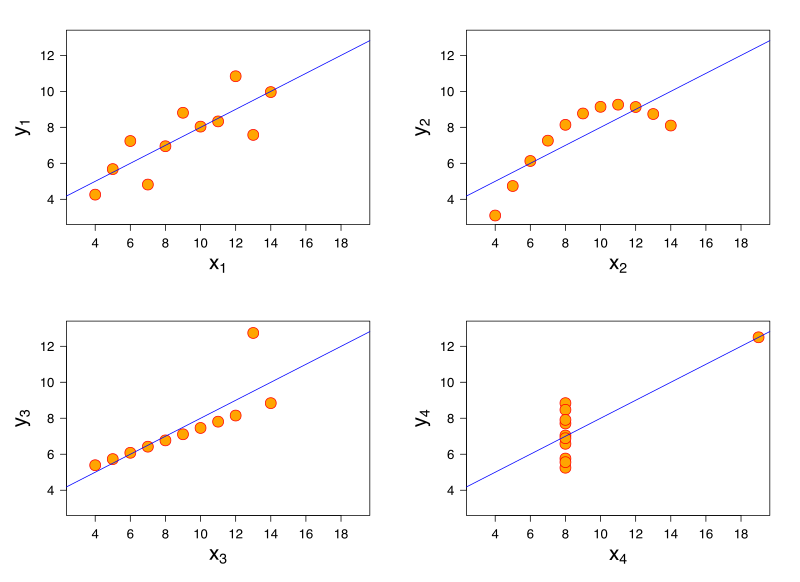
File:Anscombe's quartet 3.svg
[Source - https://en.wikipedia.org/wiki/Anscombe%27s_quartet]

All of these charts have the same mean value, but clearly show different shapes of data. If you measuring latency in your application and were targeting a mean value, you may be able to hit these targets but still have unhappy customers.

When discussing single value targets, a mean value can be thought of as just the 50th percentile. In the first case the requirement was for the 100th percentile.

Perhaps what is more useful is to measure and target several values. Maybe the 99th percentile plus targets at 99.9% and 99.99% etc is what you really are looking for.

Measuring latency with histograms

Instead of capturing a count and a sum of all latency recorded to then calculate a mean latency, you can capture latency values and assign them to a bucket. The assignment of this value to a bucket is to simply increment the count of that bucket. This now allows us to analyse the spread of latency recordings.

The example of a histogram from Wikipedia shows how to represent heights by grouping into buckets of 5cm ranges. For each value of the 31 Black Cheery Trees measured, the height is assigned to the bucket and the count for that bucket increased. Note that the x axis is linear.
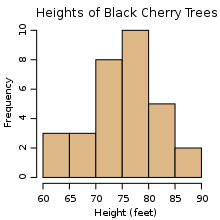
An example histogram of the heights of 31 Black Cherry trees

A naive implementation of a histogram however, may require you to pre-plan your number and width of your buckets. Gil Tene has helped out here by creating an implementation of a histogram that specifically is design for high dynamic ranges, hence its name HdrHistogram.

When you create an instance of an HdrHistogram you simply specify
  1. a maximum value that you will support
  2. the precision you want to capture as the number of significant digits
  3. optionally, the minimum value you will support
The internal data structures of the HdrHistogram are such that you can very cheaply specify a maximum value that is an order of magnitude larger than you will expect, thus giving you enough headroom for your recorded values. As the HdrHistogram is designed to measure latency a common usage would be to measure a range from the minimum supported value for the platform (nanoseconds on JVM+Linux, or ticks on .NET+Windows) up to an hour, with a fidelity of 3 significant figures.


For example, a Histogram could be configured to track the counts of observed integer values between 0 and 36,000,000,000 while maintaining a value precision of 3 significant digits across that range. Value quantization within the range will thus be no larger than 1/1,000th (or 0.1%) of any value. This example Histogram could be used to track and analyze the counts of observed response times ranging between 1 tick (100 nanoseconds) and 1 hour in magnitude, while maintaining a value resolution of 100 nanosecond up to 100 microseconds, a resolution of 1 millisecond(or better) up to one second, and a resolution of 1 second (or better) up to 1,000 seconds. At it's maximum tracked value(1 hour), it would still maintain a resolution of 3.6 seconds (or better).

Application of the HdrHistogram

When Matt (@mattbarrett) and I presented Reactive User Interfaces, we used the elements of drama and crowd reaction to illustrate the differences between various ways of conflating fast moving data from a server into a client GUI application. To best illustrate the problems of flooding a client with too much data in a server-push system, we used a modestly powered Intel i3 laptop. This worked fairly well in showing the client application coming to its knees when overloaded. However it also occasionally showed Windows coming to its knees too, which was a wee bit too much drama to have on stage during a live presentation.

Instead we thought it better to provide a static visualization of what was happening in our system when it was overloaded with data from the server. We could then contrast that with alternative implementations showing how we can perform load-shedding on the client. This also meant we could present with a single high powered laptop, instead of bringing the toy i3 along with us just to demo.

We added a port of the original Java HdrHistogram to our .NET code base. We used it to capture the latency of prices from the server, to the client, and then the additional latency for the client to actually dispatch the rendering of the price. As GUI applications are single threaded, if you provided more updates than the GUI can render, there are two things that can happen:

  • updates are queued
  • updates are conflated
What you do in your client application depends on your requirements. Some systems will need to process every message. In this case they may choose to just allow the updates to be queued. Other systems may allow updates to be conflated. Conflation is the act of taking many and reducing to one. So for some systems, they maybe able to conflate many updates and average them or aggregate them. For other systems, it may only be the last message that is the most important, so the conflation algorithm here would be to only process the last message. Matt discusses this in more detail on the Adaptive Blog.

In the demo for ReactiveTrader we demo queuing all updates and 3 styles of conflation. When we applied the HdrHistogram to our code base, we were quick to see we actually had a bug in our code base.


We had two problems. The first problem was an assumption that what worked for Silverlight, would also work for WPF. As WPF has two threads dedicated to presentation (a UI thread and a dedicated Render thread), we were actually only measuring how long it took for us to put a price on another queue! You can see that the ObserveLatest1 and ObserverLatest2 (red and yellow) lines show worse performance than just processing all items on the dispatcher. I believe this is due to us just doing more work to conflate before sending to the render thread. Unlike in Silverlight, once we send something to the Render thread in WPF we can no longer measure the time taking to actually render the change. So our measurements here were not really telling us the full story.

The second problem we see is that there was actually a bug in the code we copied from our original silverlight (Rx v1) code. The original code (red line) accidentally used a MultipleAssignmentDisposable instead of a SerialDisposable. The simple change gave us the improvements seen in the yellow line.

We were happy to see that the Conflate and ConstantRate algorithms were measuring great results, which were clearly supported visually when using the application.


To find out more about the brilliant Gil Tene
I am currently working on the final details of a complete port of the original Java HdrHsitogram to .NET. You can see my work here - https://github.com/LeeCampbell/HdrHistogram.NET

Saturday, January 11, 2014

ReplaySubject Performance improvments – code changes

In the previous post I talked about some changes that could be made to the ReplaySubject<T> implementation to squeeze large performance gains out of it. In that post I discussed mainly the result of the changes. In this post I will show some of the changes that I made.

Analysis of existing implementation

As mentioned in the previous post, all constructor overloads of the ReplaySubject<T> eventually called into the same constructor, but just provided default values for the MaxCountBuffer, MaxTimeBuffer and Scheduler. For example :

public ReplaySubject(int bufferSize, TimeSpan window, IScheduler scheduler)
{
    _bufferSize = bufferSize;
    _window = window;
    _scheduler = scheduler;

    _stopwatch = _scheduler.StartStopwatch();
    _queue = new Queue<TimeInterval<T>>();
    _isStopped = false;
    _error = null;

    _observers = new ImmutableList<ScheduledObserver<T>>();
}

public ReplaySubject(int bufferSize, TimeSpan window)
    : this(bufferSize, window, SchedulerDefaults.Iteration)
{ }

public ReplaySubject()
    : this(InfiniteBufferSize, TimeSpan.MaxValue, SchedulerDefaults.Iteration)
{ }

public ReplaySubject(IScheduler scheduler)
    : this(InfiniteBufferSize, TimeSpan.MaxValue, scheduler)
{ }

public ReplaySubject(int bufferSize, IScheduler scheduler)
    : this(bufferSize, TimeSpan.MaxValue, scheduler)
{ }

public ReplaySubject(int bufferSize)
    : this(bufferSize, TimeSpan.MaxValue, SchedulerDefaults.Iteration)
{ }

public ReplaySubject(TimeSpan window, IScheduler scheduler)
    : this(InfiniteBufferSize, window, scheduler)
{ }

public ReplaySubject(TimeSpan window)
    : this(InfiniteBufferSize, window, SchedulerDefaults.Iteration)
{ }

There are a total of 8 constructor overloads, but 7 of them just delegate to the top overload above, passing default values.

Next, lets look at the Subscribe method. Here we see the passed observer is wrapped in a ScheduledObserver<T>, which is only relevant for time based buffers. Also a Trim() command is made which again is only relevant for time based buffers.

public IDisposable Subscribe(IObserver observer)
{
    var so = new ScheduledObserver(_scheduler, observer);
    var n = 0;
    var subscription = new RemovableDisposable(this, so);
    lock (_gate)
    {
        CheckDisposed();
        Trim(_stopwatch.Elapsed);
        _observers = _observers.Add(so);

        n = _queue.Count;
        foreach (var item in _queue)
            so.OnNext(item.Value);

        if (_error != null)
        {
            n++;
            so.OnError(_error);
        }
        else if (_isStopped)
        {
            n++;
            so.OnCompleted();
        }
    }
    so.EnsureActive(n);
    return subscription;
}

The next part of the code that is interesting is the implementation of the OnNext method.

public void OnNext(T value)
{
    var o = default(ScheduledObserver<T>[]);
    lock (_gate)
    {
        CheckDisposed();

        if (!_isStopped)
        {
            var now = _stopwatch.Elapsed;
            _queue.Enqueue(new TimeInterval<T>(value, now));
            Trim(now);

            o = _observers.Data;
            foreach (var observer in o)
                observer.OnNext(value);
        }
    }

    if (o != null)
        foreach (var observer in o)
            observer.EnsureActive();
}

There are several things to note here:

  1. The use of an array of ScheduledObserver<T>
  2. The use of the TimeInterval<T> envelope for the value
  3. The Trim() command

Each of the three things above become quite dubious when we consider ReplayAll and ReplayOne implementations. A ReplayMany implementation, may need a Trim() command, but surely does not need ScheduledObservers nor its values time-stamped.

Next we look at the Trim command itself:

void Trim(TimeSpan now)
{
    while (_queue.Count > _bufferSize)
        _queue.Dequeue();
    while (_queue.Count > 0 && now.Subtract(_queue.Peek().Interval).CompareTo(_window) > 0)
        _queue.Dequeue();
}

Again we see that the code for the second while loop is wholly unnecessary for non-time based implementations.

Each of these small overheads start to add up. However where the cost really start to kick in is in the implementation of the ScheduledObserver<T>.

At a minimum, for each OnNext call to a ReplaySubject<T>, the ScheduledObserver<T> performs some condition checks, virtual method calls and some Interlocked operations. These are all fairly cheap operations. It is the unnecessary scheduling that incurs the costs. The scheduling incurs at least the following allocations

  1. ScheduledItem<TimeSpan, TState>
  2. AnonymousDisposable and the Action
  3. IndexedItem

There is also all the queues that are involved.

  1. ReplaySubject<T>._queue (Queue<TimeInterval<T>>)
  2. ScheduledObserver<T>._queue (ConcurrentQueue<T>)
  3. CurrentThreadScheduler.s_threadLocalQueue (SchedulerQueue<TimeSpan>)

And the concurrency controls

  1. ReplaySubject uses the IStopWatch from _scheduler.StartStopwatch()
  2. ScheduledObserver<T>; will use Interlocked.CompareExchange 3-4 times on a standard OnNext call.
  3. ConcurrentQueue uses a Interlocked.Increment and also a System.Threading.SpinWait when en-queuing a value. It also uses up to 3 SpinWaits and a Interlocked.CompareExchange to de-queue a value.
  4. The recursive scheduling extension method use lock twice
  5. CurrentThreadScheduler uses a Thread.Sleep()

Alternative implementations

All of the code above is fairly innocent looking when looked at in isolation. However, when we consider what we probably need for a ReplayOne, ReplayMany or ReplayAll implementation, all this extra code might make you blush.

The implementations that do not have a time consideration now share a base class and its updated OnNext implementation is now simply:

public void OnNext(T value)
{
    lock (_gate)
    {
        CheckDisposed();

        if (!_isStopped)
        {
            AddValueToBuffer(value);
            Trim();

            var o = _observers.Data;
            foreach (var observer in o)
                observer.OnNext(value);
        }
    }
}

The ReplayOne implementation is now reduced to :

private sealed class ReplayOne : ReplayBufferBase, IReplaySubjectImplementation
{
    private bool _hasValue;
    private T _value;

    protected override void Trim()
    {
        //NoOp. No need to trim.
    }

    protected override void AddValueToBuffer(T value)
    {
        _hasValue = true;
        _value = value;
    }

    protected override void ReplayBuffer(IObserver<T> observer)
    {
        if (_hasValue)
            observer.OnNext(_value);
    }

    protected override void Dispose(bool disposing)
    {
        base.Dispose(disposing);
        _value = default(T);
    }
}

Note that there are no queues, schedulers, allocations etc. We have replaced all of that with simply a field to hold the single value, and a boolean flag to indicate if there has been a value buffered yet.

This is allowed to become so simple due to the base class ReplayBufferBase:

private abstract class ReplayBufferBase : IReplaySubjectImplementation
{
    private readonly object _gate = new object();
    private bool _isDisposed;
    private bool _isStopped;
    private Exception _error;
    private ImmutableList<IObserver<T>> _observers;

    protected ReplayBufferBase()
    {
        _observers = new ImmutableList<IObserver<T>>();
    }

    protected abstract void Trim();
    protected abstract void AddValueToBuffer(T value);
    protected abstract void ReplayBuffer(IObserver<T> observer);

    public bool HasObservers
    {
        get
        {
            var observers = _observers;
            return observers != null && observers.Data.Length > 0;
        }
    }

    public void OnNext(T value)
    {
        lock (_gate)
        {
            CheckDisposed();

            if (!_isStopped)
            {
                AddValueToBuffer(value);
                Trim();

                var o = _observers.Data;
                foreach (var observer in o)
                    observer.OnNext(value);
            }
        }
    }

    public void OnError(Exception error) {/*...*/}

    public void OnCompleted() {/*...*/}

    public IDisposable Subscribe(IObserver<T> observer) {/*...*/}

    public void Unsubscribe(IObserver<T> observer) {/*...*/}

    private void CheckDisposed() {/*...*/}

    public void Dispose() {/*...*/}

    protected virtual void Dispose(bool disposing) {/*...*/}
}

The ReplayMany and ReplayAll implementations are slightly more complex as they require a Queue to store the buffered values. Again we add another base class to do most of the work.

private abstract class ReplayManyBase : ReplayBufferBase, IReplaySubjectImplementation
{
    private readonly Queue<T> _queue;

    protected ReplayManyBase(int queueSize)
        : base()
    {
        _queue = new Queue<T>(queueSize);
    }

    protected Queue<T> Queue { get { return _queue; } }

    protected override void AddValueToBuffer(T value)
    {
        _queue.Enqueue(value);
    }

    protected override void ReplayBuffer(IObserver<T> observer)
    {
        foreach (var item in _queue)
            observer.OnNext(item);
    }

    protected override void Dispose(bool disposing)
    {
        base.Dispose(disposing);
        _queue.Clear();
    }
}

Now the only differences are the initial buffer size and whether the buffer gets trimmed or not. This leaves us with the final two implementations:

private sealed class ReplayMany : ReplayManyBase, IReplaySubjectImplementation
{
    private readonly int _bufferSize;

    public ReplayMany(int bufferSize)
        : base(bufferSize)
    {
        _bufferSize = bufferSize;
    }

    protected override void Trim()
    {
        while (Queue.Count > _bufferSize)
            Queue.Dequeue();
    }
}

private sealed class ReplayAll : ReplayManyBase, IReplaySubjectImplementation
{
    public ReplayAll()
        : base(0)
    {
    }

    protected override void Trim()
    {
        //NoOp; i.e. Dont' trim, keep all values.
    }
}

Less code, more speed

Like Kunu says "Do less".

By removing a lot of the excess code we are able to massively improve the performance of the ReplaySubject<T> for arguably most use-cases.

Tuesday, May 29, 2012

But it is not our competitive advantage!

The financial industry (Capital Markets specifically) is a fiercely competitive arena of high risk, high return and space age technology. The competition between banks, hedge funds and exchanges leads to a very closed-source style of application development. IT secrets are closely guarded. Non-compete clauses are common place and Non Disclosure Agreements are taken very seriously. Like in other industries, time-to-market and rich feature sets increase the likely hood of an application or platform making profit.

To get the best product delivered in the fastest time, the best of breed developers and consultants are wheeled in and money is generally thrown at the problem. All the same old stuff is built from ground up hidden away from prying eyes to protect any market secret getting out. Features start getting built; Security (Authentication/Authorization/Auditing), Low latency Messaging, Blotters/Grids controls, Concurrency frameworks, Modular UIs, Blotters, Order books, Matching algorithms, Blotters, Pricing engines, Discounting curves, JSON/Fix/ProtoBuf Serializers, Risk Visualizers, Blotters, Search tools, Research tickers and of course we should build a blotter!

It is most certainly the case that all of these things are being done by the direct competitor, by a group of similar people, with similar skill sets, falling into the same problems and building the same bugs. All behind closed doors. All at consultant rates.

Managers and business owners feel the need to carefully guard their babies (the project source code) because it is the sum of the effort and more importantly the money invested in the project. To let it out in to the public would be (in their minds) the same as leaving a chest of gold open in a public park or their password to the company bank account on a post-it note. But this is not the case.

Let's enumerate the silly realities of the scenario:

  1. For the consultant to get the job they must exhibit the requisite experience delivering said technology. This means the consultant may be just reproducing their effort. Surely you are hiring the consultant to succeed on their last project right? So to get ahead of the competition you have hired the guy that has finished building their competing product.
  2. Once the consultant has built their part of the product, they either have to document it at huge cost, train the team in how it works, or just leave the project keeping all the knowledge of how it works. They move on to the next project, build another blotter, rinse and repeat.
  3. Consider the need to apply any modifications (improvements or bug fixes) to the code base.  The consultant could be applying their new features to their new version of the feature at competitor X. Your current team of developers could be applying it to your product. Either way, the same general concept is being refined either at twice the necessary cost, or features are being added to one leaving the other behind.

For a concrete example, consider the feature we are talking about is a grid control (commonly called a blotter in finance). Many will argue that the cost of a blotter is just not even enough to warrant even considering. Not true. I have been on 4 projects now where the Blotter or central grid has been the number one development cost. You can argue that we can just buy a control, but those 3rd party controls are lousy. My position is not a case of Not Invented Here mentality; I do advocate 3rd party tools like Rx, Moq, Prism, charting tools, Messaging layers etc...but only when they pay for themselves. Adopting large 3rd party libraries for a single feature or needing competing libraries installed because neither quite fits the requirements needs to be a thing of the past. I have worked with amazing developers that get pulled off otherwise critical work to help work on the blotter. With all that money that is poured into the blotter, we had better keep that blotter source code a trade secret! or should we.....?

But it is not our competitive advantage!

None of the four projects I worked on wanted to be defined by their blotter; they wanted to be defined by

  • Speed of user input
  • Quality of context sensitive research
  • Timeliness of data
  • User experience
  • Competitive prices
  • Depth of research data
  • Breadth of data across assets
  • Liquidity

So now considering that a blotter is not your competitive advantage and you as a manager were brave, and smart enough, to split your code base into code that is not sensitive and code that contains actual trade secrets. Now when that super expensive consultant builds that blotter for you, it may already be half built because it was open source in the first place. Consider when the consultant leaves and re implements that at the competitor, they may find bugs and fix them. Great! You just got that hugely expensive consultant to upgrade your product for free! Sure the competitor got the fix too, but you have tighter spreads, right? Lower latency, right? Better customer service, right? Why pour money into another blotter, another concurrent collection library, another export to Excel feature, another login system, another drag-n-drop feature? Spend your money on your competitive advantage.

Leaders in the field are coming together now to banish this kind of wasteful behaviour. The Lodestone Foundation is looking to open source much of what is burning a hole in capital market IT budgets around the world. They have a sort of rough road map of features and areas that they want to address. This is not a silver bullet but it is a huge step in the right direction. With people like Martin Thompson involved, it is likely to get traction at least with lowly developers. Martin has already proved that you can open-source key parts of the system while still keeping trade secrets and remaining competitive.

Microsoft, lead by Herb Sutter, is pushing for the same kind of collaboration in the C++ space. Projects like Casablanca are aiming to reduce the same wasteful practices in the C++ world by providing portable libraries for general consumption.

From what I understand (via rumours mainly), the thinking is; if we as an industry can spend less money and time reinventing the same wheel for each project, real effort can be put into valuable technical advancement. The beauty with this is the huge IT budgets the capital market projects have can now effectively fund R&D for the greater good. If all the code produced is Open-Source, well maintained and has a thriving community, all will benefit regardless of industry. Imagine advances in risk analysis simulations being used to help design safer cars, order matching algorithms used to help DNA research, financial time-series predication techniques used in speech recognition software.

I personally have been working on my own (much smaller scale) project that fits in with these ideals. Time will tell if they end up being complementary (I hope they do). Until then, go sew the seed with your manager that if your data-access layer, unit testing framework and logging framework are all open source, why can't your blotter* be too?

*blotter is my bugbear. Use whatever industry agnostic thing your project is building that really is just the same as the competitions as your focal point.

Technorati Tags: ,